Insight's Cloud Commerce Reporting (CCR) User Guide
Insight's Cloud Consumption Reporting Platform - CCR
Your Cloud Spent in a single platform
Insight’s Cloud Consumption Reporting (CCR) at https://ccr.insight.com is a centralized reporting and visibility platform that helps you understand, track, and manage your cloud spend across multiple vendors. Through CCR, you can access detailed invoices and usage reports for Microsoft, AWS, and Adobe, all in one place, using your existing Insight CCx credentials.
CCR provides clear insights into both billed and unbilled consumption, allowing you to monitor current usage, review historical trends, and better forecast upcoming costs before invoices are finalized. With interactive dashboards and downloadable reports, CCR enables improved cost transparency, supports informed decision‑making, and helps identify opportunities to optimize cloud usage over time.
Designed for finance, IT, and procurement stakeholders alike, CCR ensures that all relevant users have access to accurate, actionable cloud consumption data—helping organizations save time, improve cost control, and confidently manage their cloud investments with Insight.
- Access at https://ccr.insight.com, or from CCx under the Invoices & Reports section
- Your CCx credentials will work for CCR. If you have recently been added to CCx, please allow several hours for your account to synchronize.
Key Benefits of CCR:
- Helps improve cost management by providing visibility into spend and identifying potential cost‑optimization opportunities.
- Saves time and increases efficiency by reducing the effort required to manage licenses and maximizing team productivity.
- Ensures that all stakeholders involved in license management have access to accurate and actionable data, enabling them to use their time more effectively.
Home Page / Dashboard:
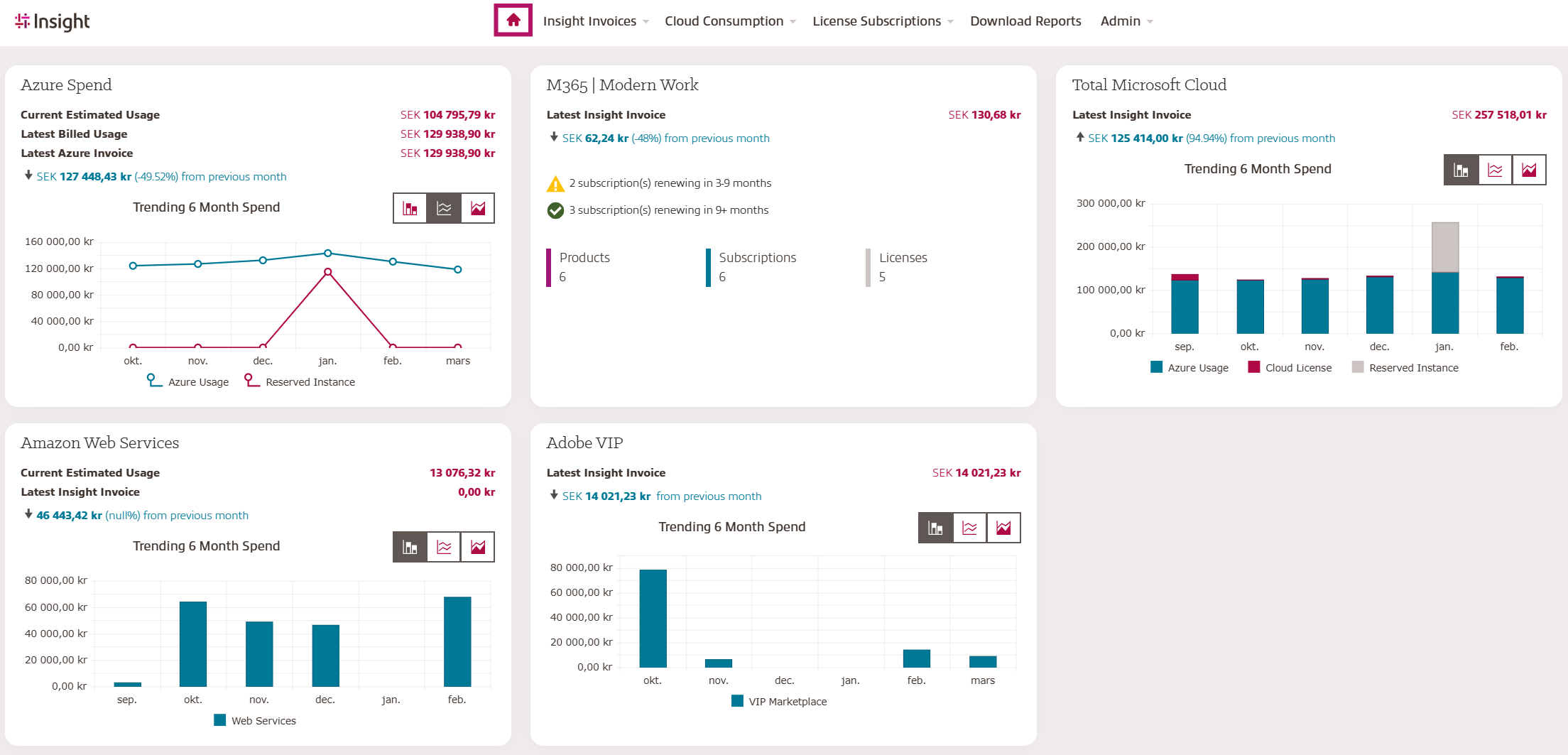
The CCR home page is a snapshot of your most recent invoiced spend per cloud vendor (Microsoft, Adobe & AWS).
Click on the tiles or use the top menu to drill down into your cloud spend.
Insight Invoices Details:
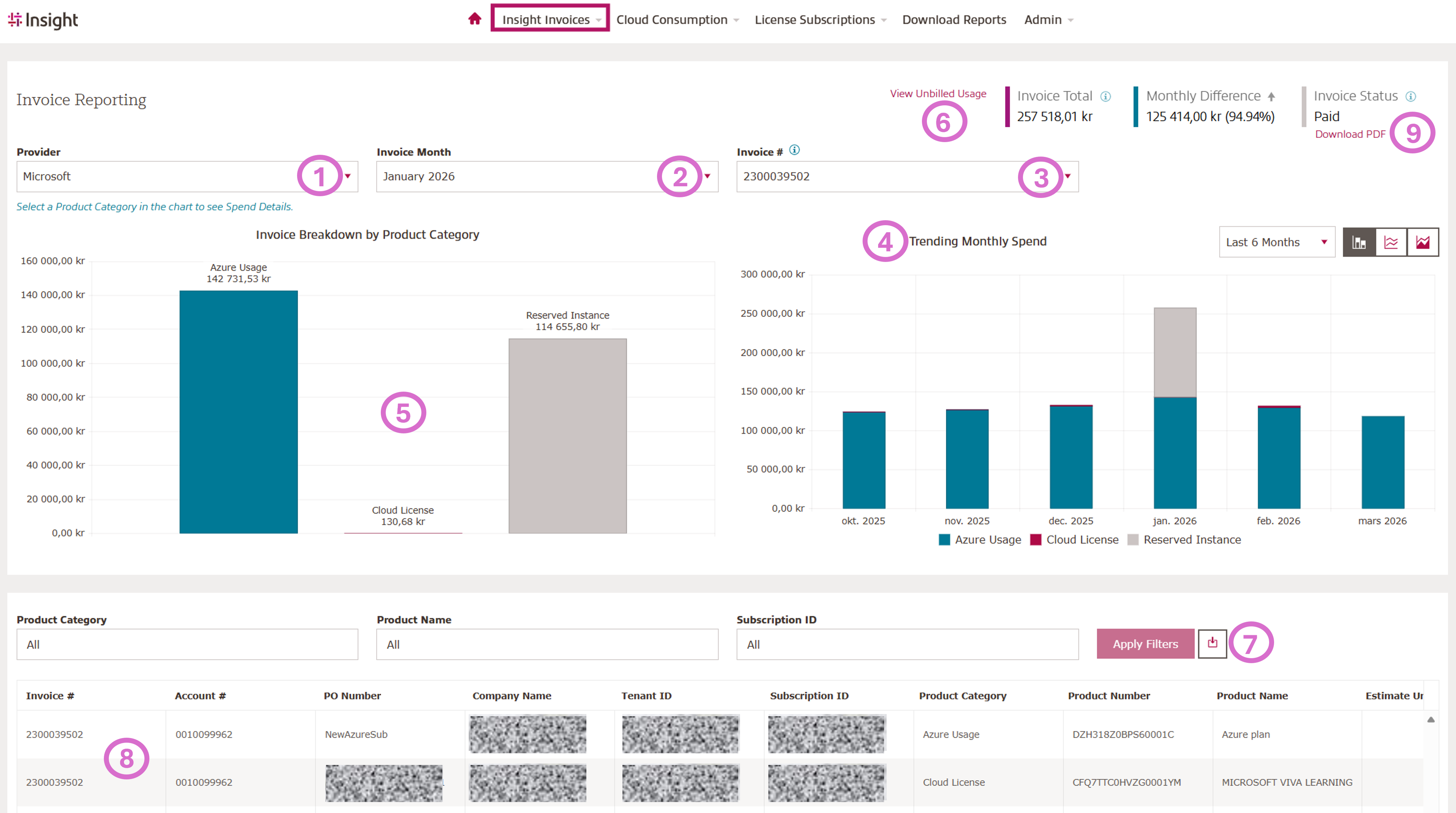
Here you can find detailed Cloud Care invoice information.
Select – Invoice Details:
- Select your cloud vendor
- Select your Invoice month
- Select your Invoice number
- See the trending spend for the recent 6 months to quickly see growth and spikes
- Invoice Breakdown by Product Category - Click the bar graph to filter the table below (8) to the desired Product Category. Click on the Vendor Usage bar to see the Billed consumption report for that month as well.
- Click to see current, not yet billed consumption
- Click to download billable your billable items report
- Detailed information by product - Invoice Number, Account Number, PO Number, Company Name, Tenant ID, Subscription ID, Product Category, Product Number, Product Name, Estimate Unit Price, Quantity, Total Price, Currency, Invoice Date, Charge Start Date, Start End Date, Insight Subscription ID, Bill ID, Bill Item ID, Billing Frequency, Billing Cycle, Effective Start Date, Commitment End Date, Domain Name, Promotion ID, Promotion Description, Charge Type
- Download your invoice
Insight Invoices History:
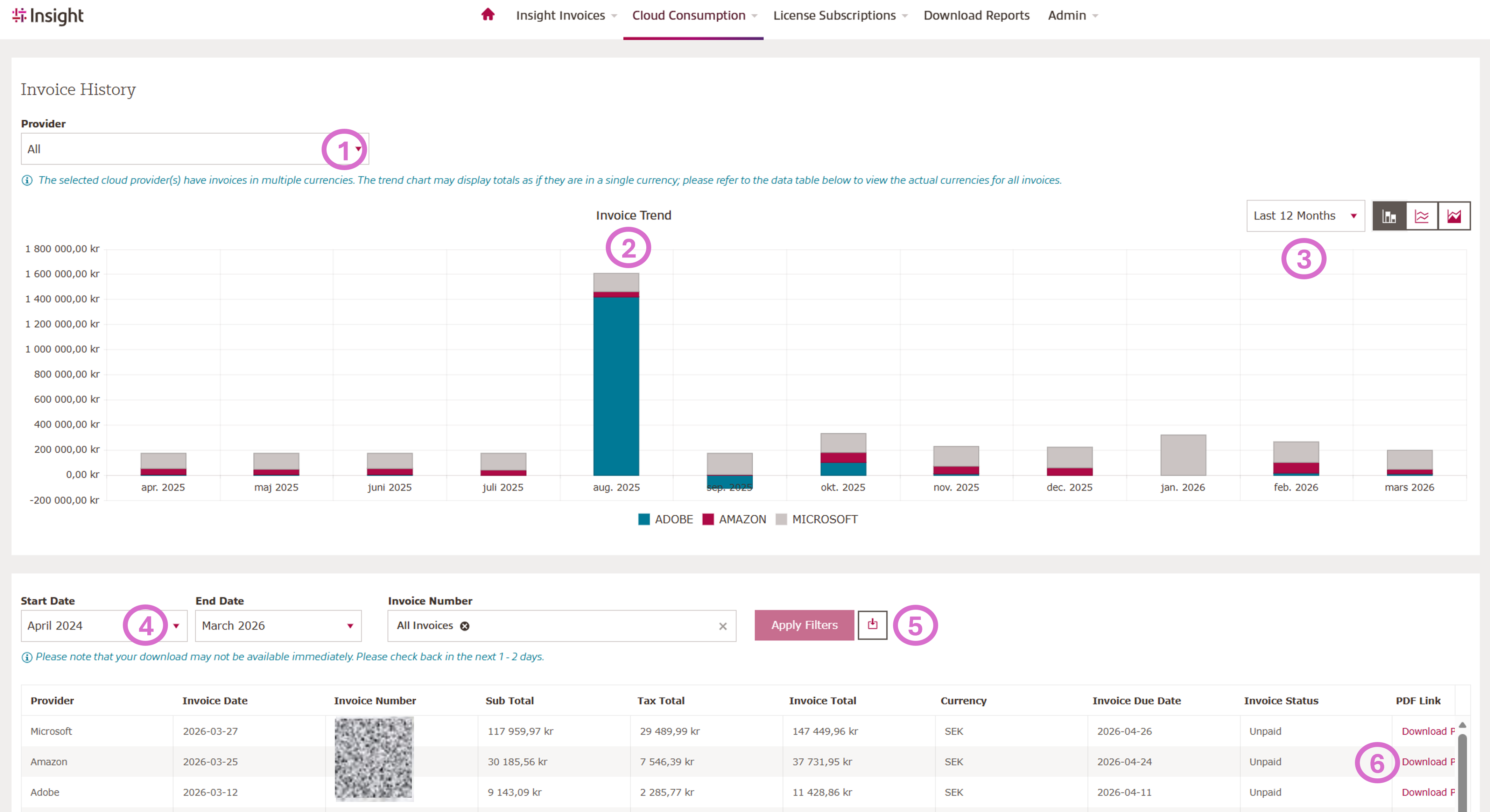
Select - Cloud Consumption - Invoice details:
- Select your Cloud Vendor/Provider
- Your Invoice Trend by Cloud Vendor
- View a snapshot of the Last 12 Months or per Year
- Choose desired data range to filter
- Click to download filtered data
- Click to download invoice PDF or Click to View Invoice Details page
Microsoft Azure Billed Consumption Details:
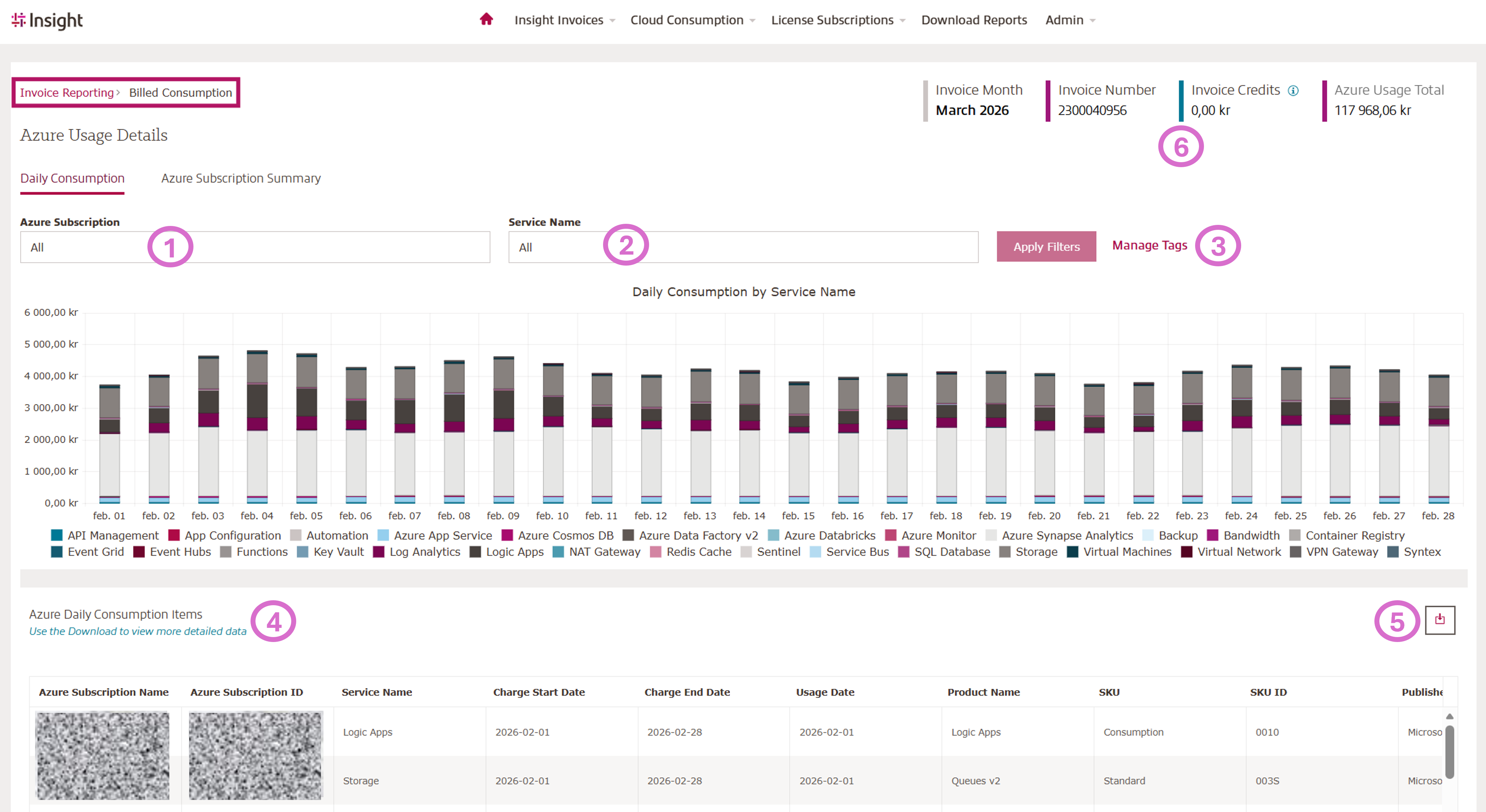
Select – Cloud Consumption – Azure plan invoice – View Billed Usage:
- Click to see breakdown by subscription
- Filter by Service Name
- Click to Manage Tags
- Details listed below
- Click to download details into Excel
- Invoice Details
Microsoft Azure Breakdown per Subscriptions:
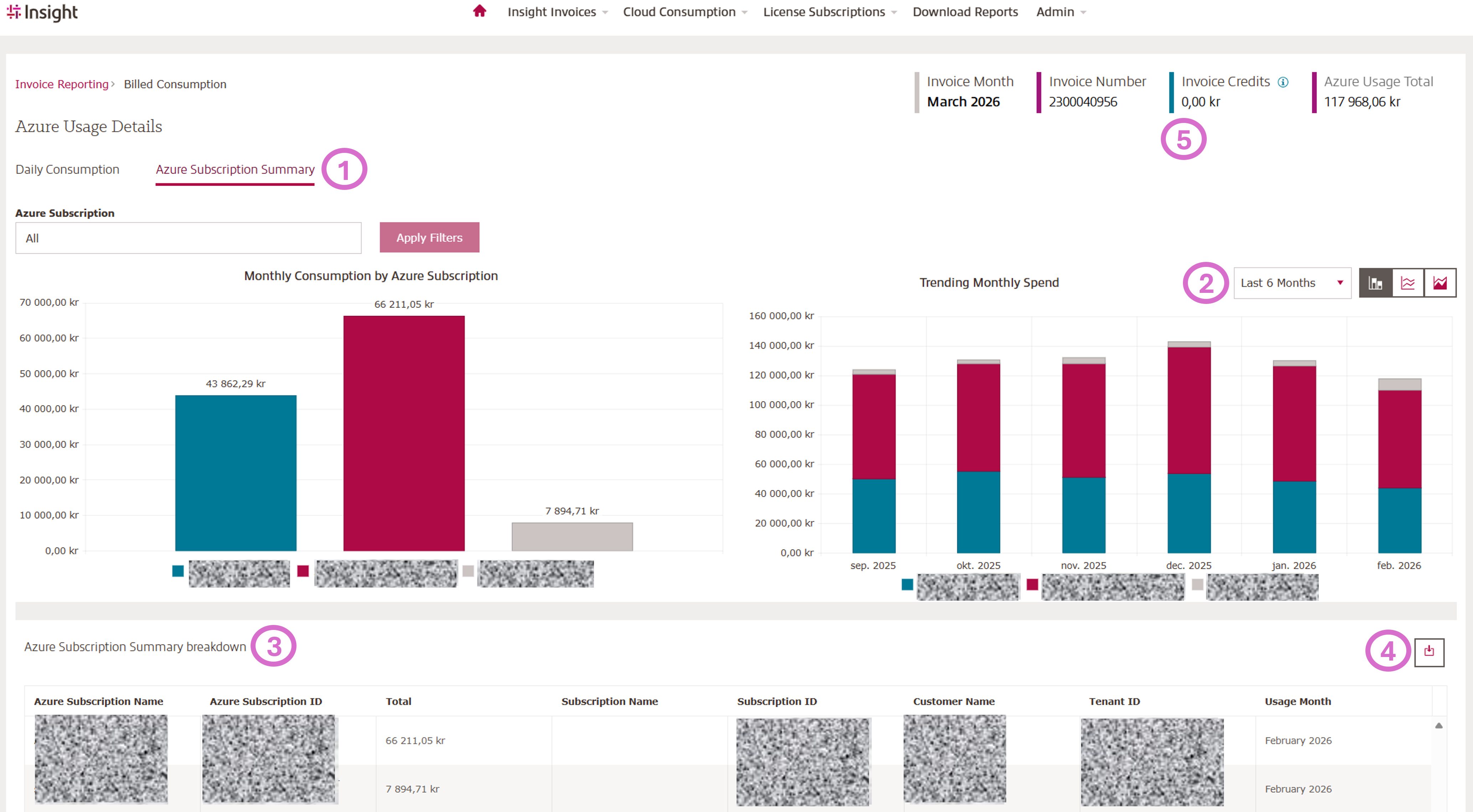
Select Azure Subscription Summary
- Click to see the breakdown by subscription
- View a snapshot of the last 6 or 12 months
- Details listed below
- Click to download details into Excel
- Invoice Details
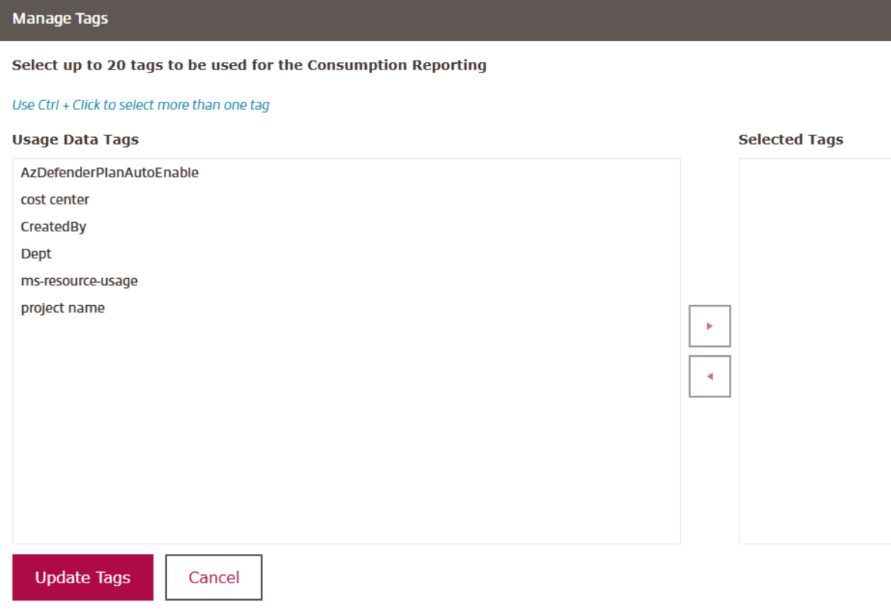
Manage Tags:
The best tagging schemas are:
- Very simple
- Have not more than 10 top level tags
- Are well documented and reviewed for currency and accuracy frequently
- Most cloud users have tags that have gotten a little out of control
CCR allows you to choose up to 20 tags for reporting.
Once you have selected them, they will be available in the details for download on the Azure Consumption Details Page.
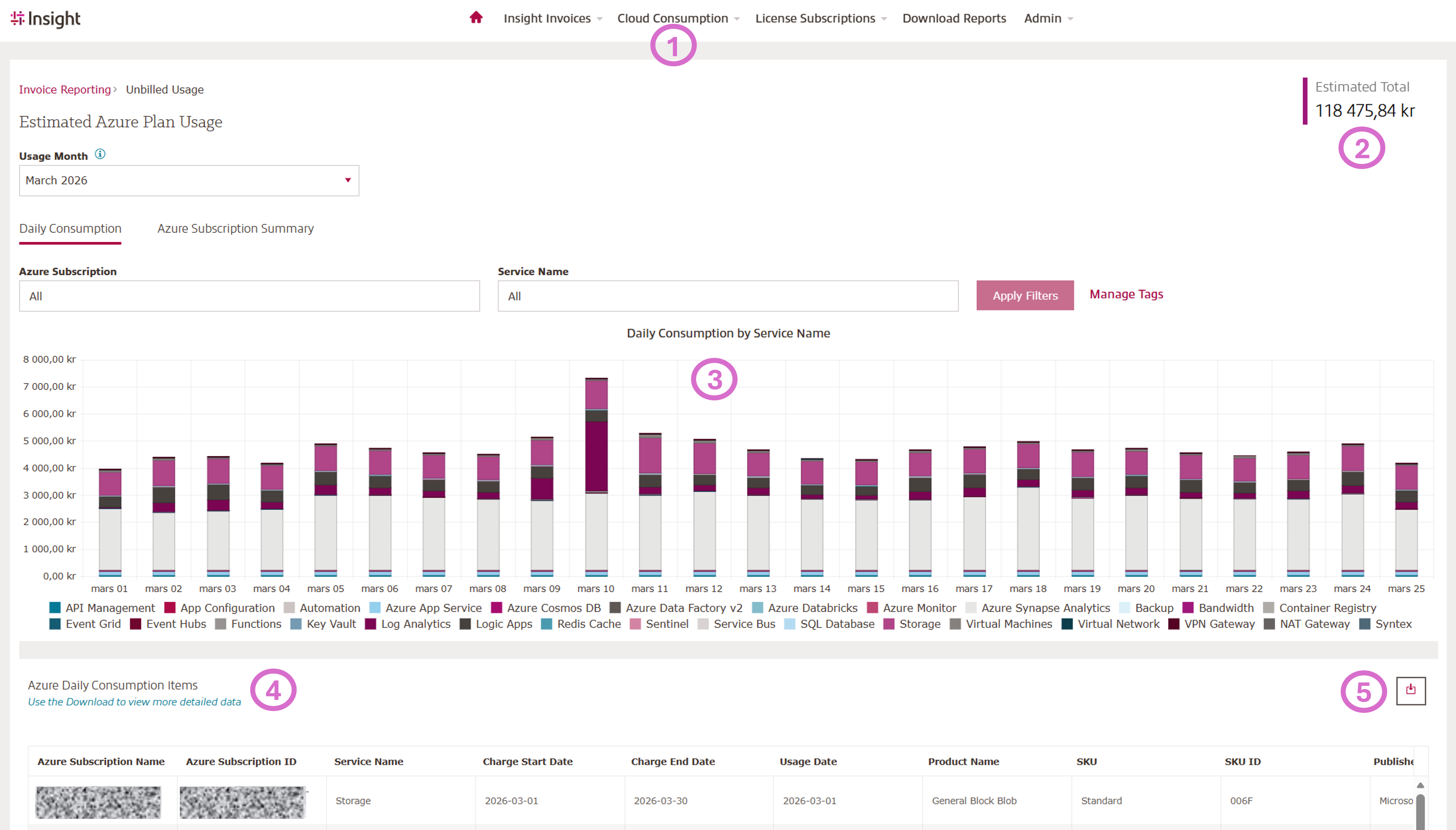
Not yet billed (unbilled) Azure Consumption:
- Click Cloud Consumption - Select Azure Plan Unbilled Consumption
- Cost will not be finalized until the end of the month
- Daily Consumption by Service Name
- Details listed below
- Click to download details into Excel
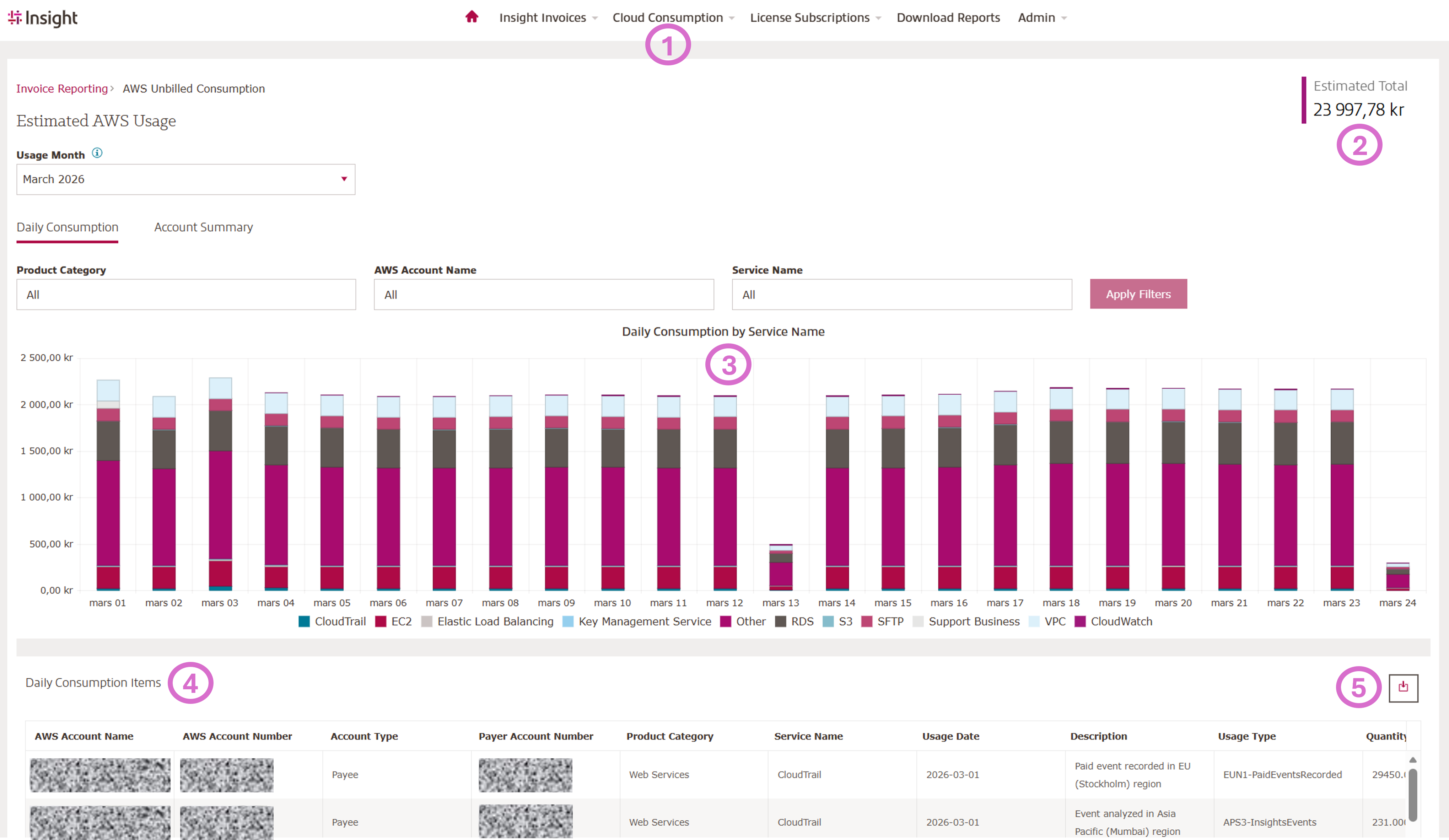
Not yet billed (unbilled) AWS:
- Click Cloud Consumption - Select AWS Unbilled Consumption
- Cost will not be finalized until the end of the month
- Daily Consumption by Service Name
- Details listed below
- Click to download details into Excel
Microsoft License Subscription Overview:
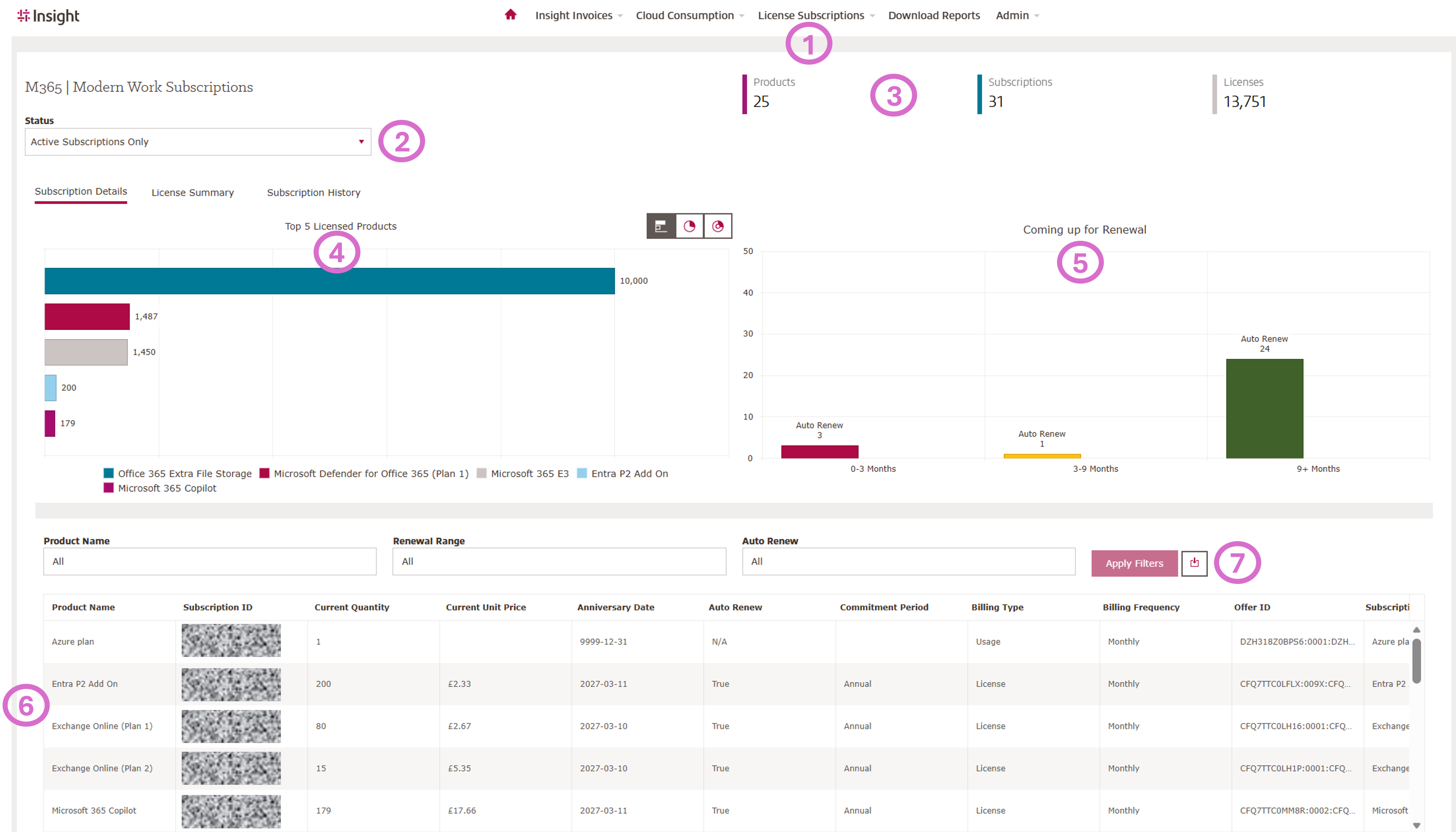
Subscription Details:
- Click on Licenses Subscriptions and choose your vendor (M365 I Modern Work)
- Filter by status
- View the subscription summary
- View your Top 5 Licensed Products
- Subscriptions coming up for Renewal, click the bar to filter below table (6) to show renewing / expiring subscriptions
- Details list
- Click to download details into Excel
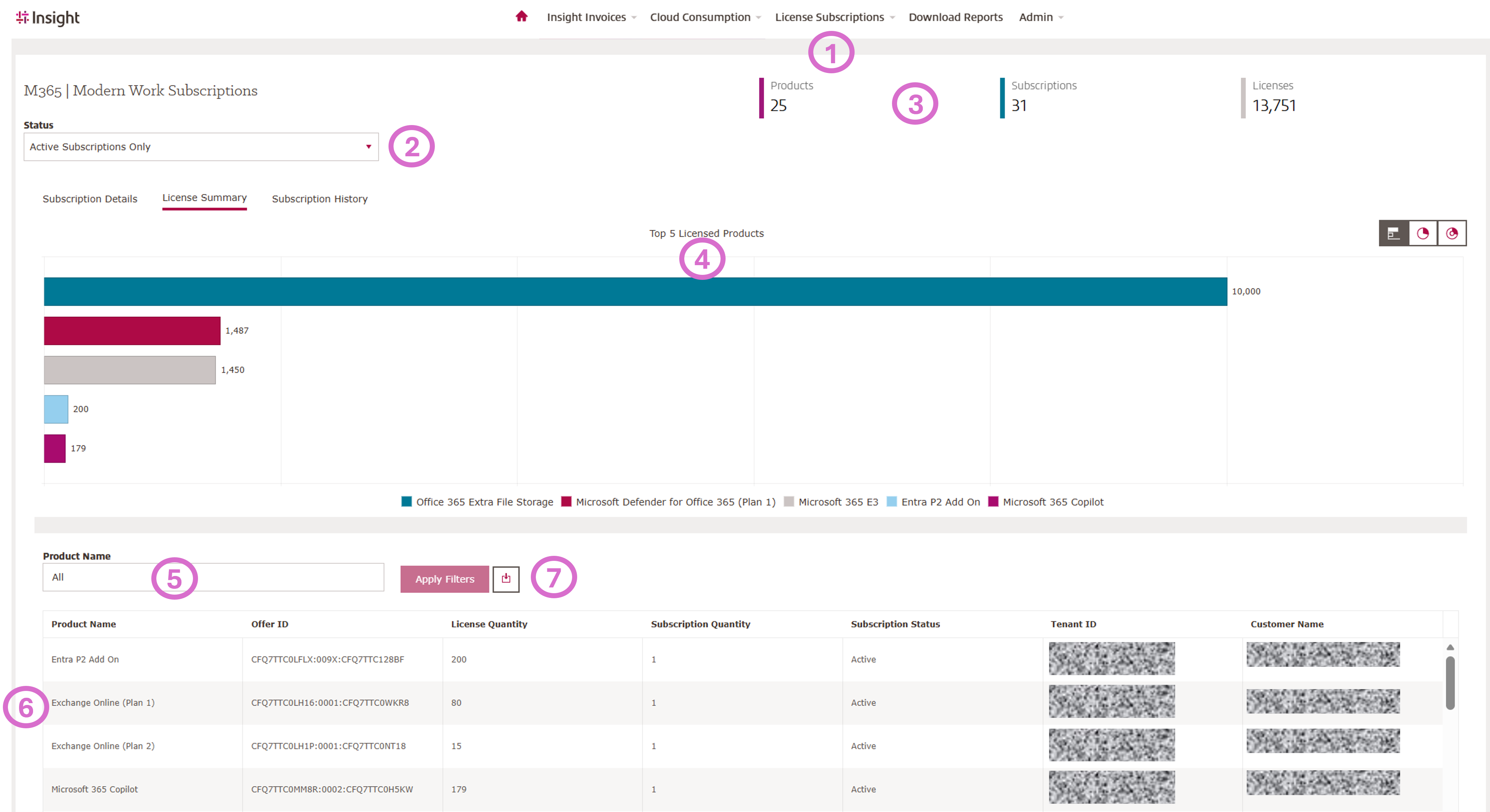
License Summary:
- Click on Licenses Subscriptions and choose your vendor (M365 I Modern Work)
- Filter by status
- View the subscription summary
- View your Top 5 Licensed Products
- View your subscriptions details and filter per product
- Details list
- Click to download details into Excel
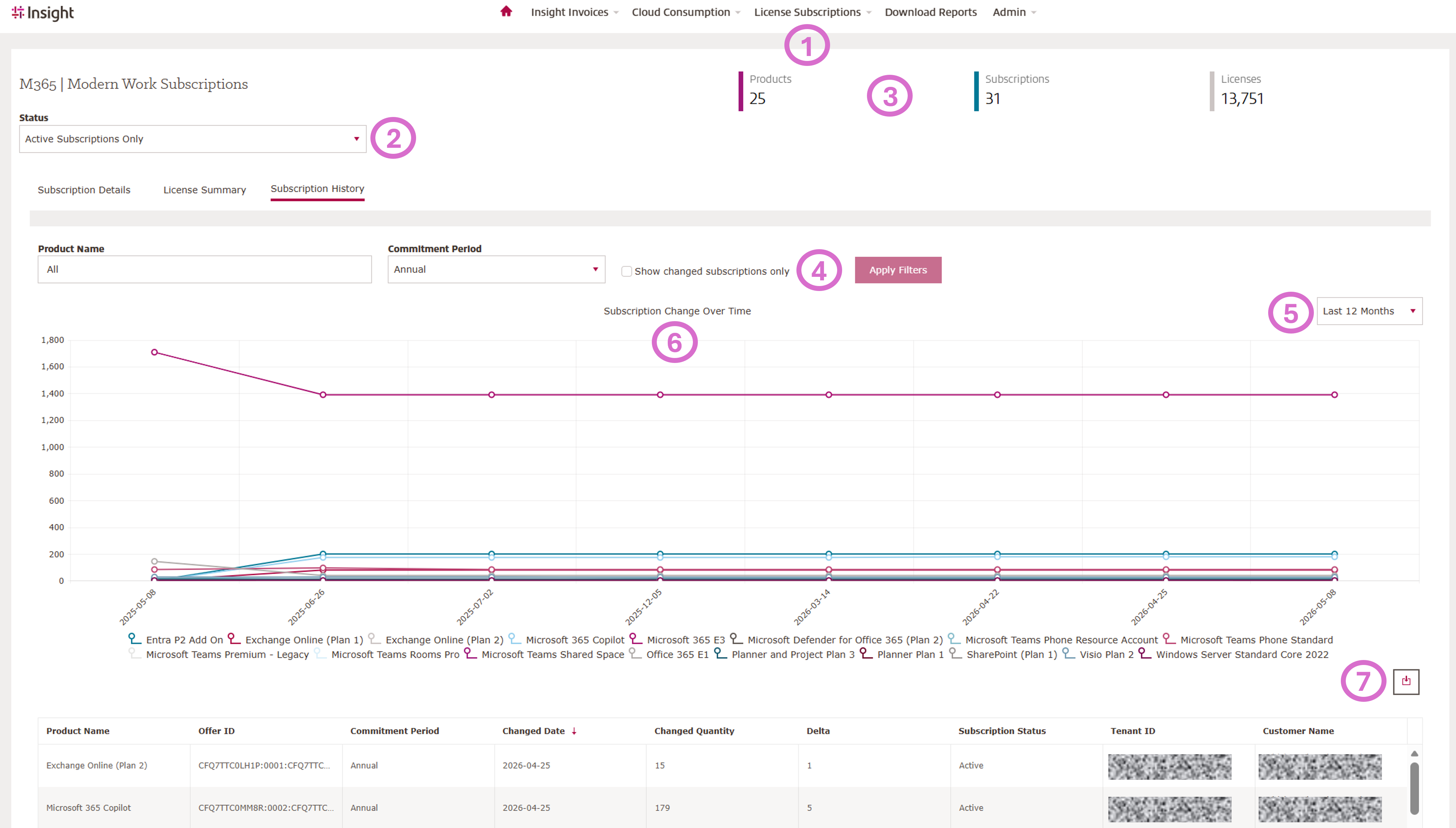
Subscription History:
- Click on Licenses Subscriptions and choose your vendor (M365 I Modern Work)
- Filter by status
- View the subscription summary
- Filter per Product Name or Comitment Period
- Selelct the time period
- See your subscription History Details
- Click to download details into Excel
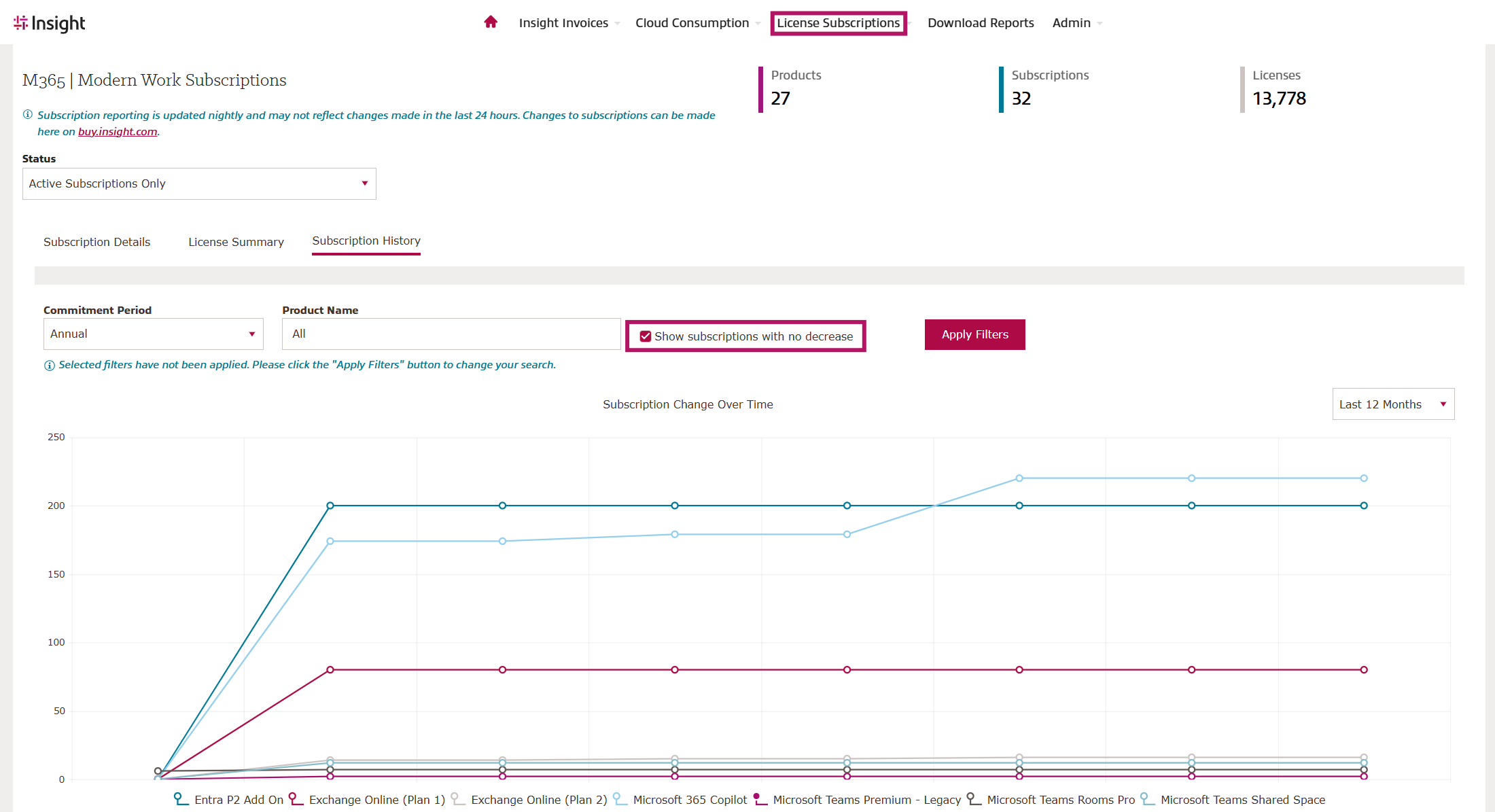
Gain Visibility into Your Monthly-Term Subscriptions:
Do you still use monthly-term subscriptions and want to understand if there are better options? CCR now includes a new "Show Subscriptions with no decrease" option on the M365 Subscription History page, helping you quickly identify subscriptions that have remained unchanged or only increased over time.
This new filter can highlight subscriptions that may be good candidates for an annual commitment, potentially reducing licensing costs. For example, a customer with six monthly-term subscriptions that had only stayed the same or grown over the past year was found to be spending significantly more than necessary. Based on typical pricing differences between monthly and annual terms, the customer could potentially save nearly $5,000 per year by moving eligible subscriptions to an annual commitment.
Use this enhancement to identify optimization opportunities, improve cost efficiency, and make more informed licensing decisions.
Adobe License Subscription Overview:
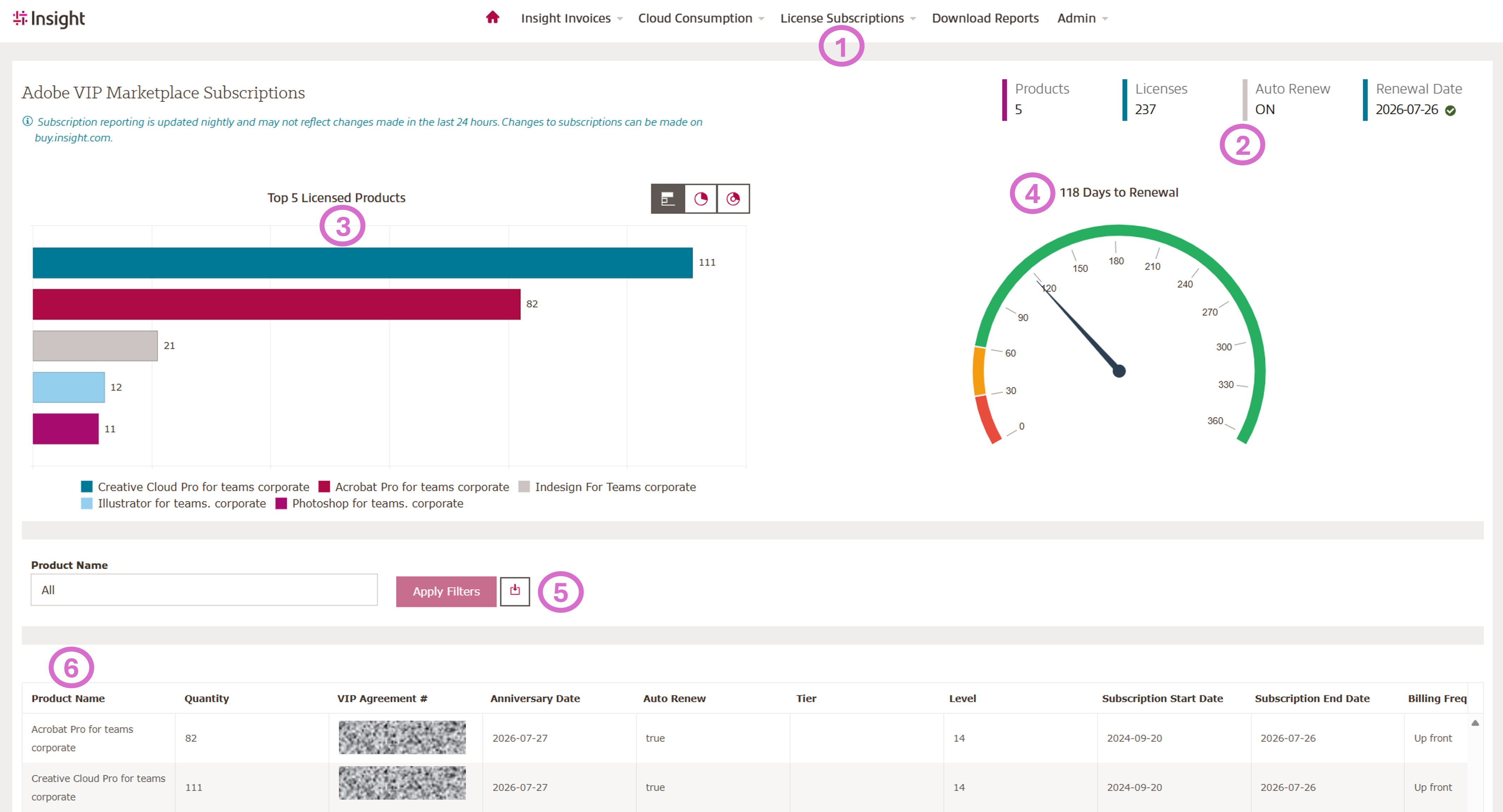
This view provides a clear overview of your Adobe VIP subscription, including contract details, top licensed products, renewal timelines, and downloadable, filterable license data—all in one place.
- Click On Licenses Subscriptions and choose your vendor (Adobe VIP Marketplace)
- View the contract summary
- View your Top 5 Licensed Products, click the bar to filter below table (6)
- Days until Renewal
- Apply Filter by Product Name and Click to download into Excel
- Details list
Download and Shedule Reports:
Available Reports:
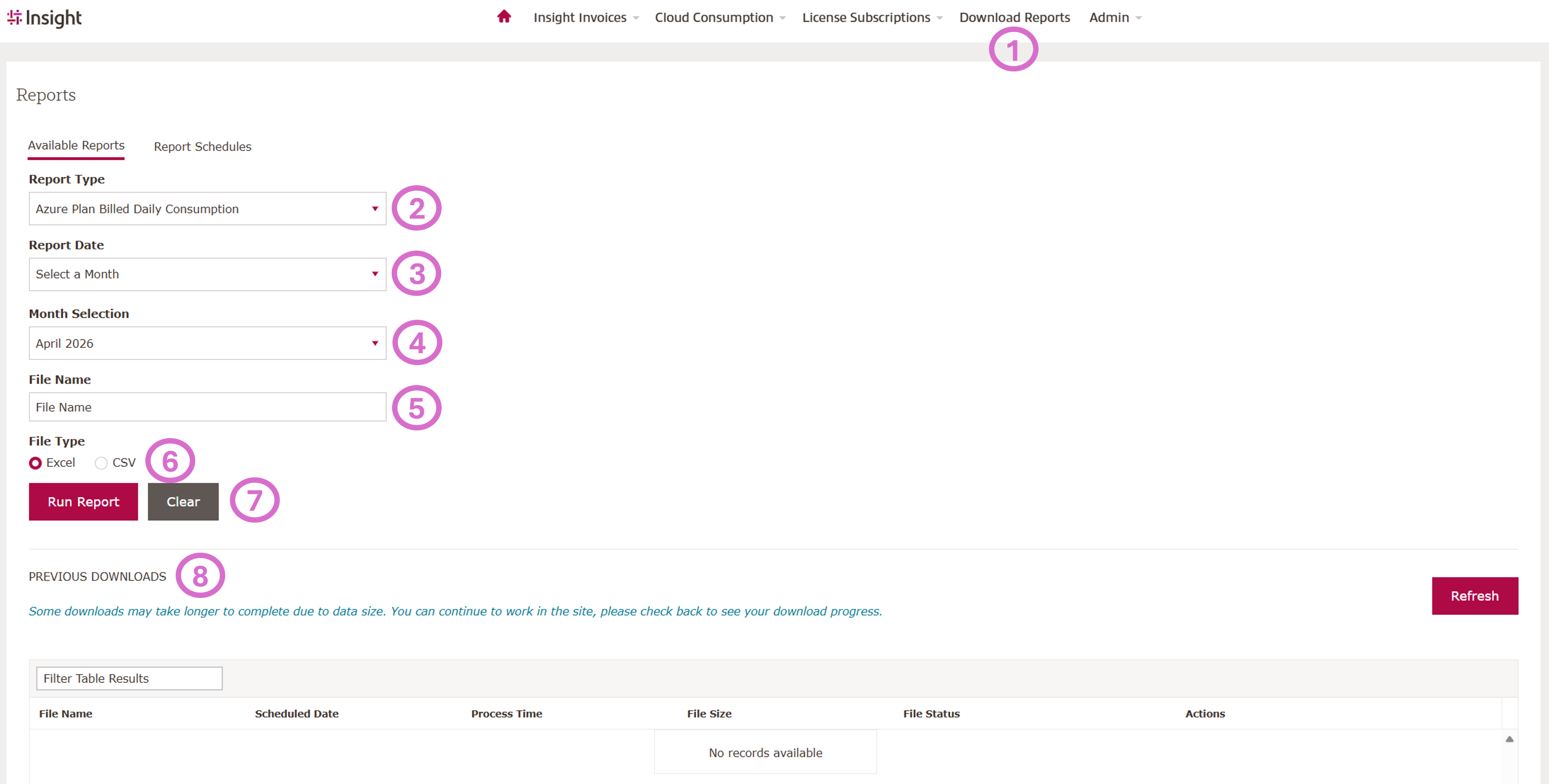
Insight's Cloud Consumption Reporting Platform (CCR) allows you to easily generate and download detailed cloud invoice and usage reports by selecting the report type, time period, and file format, giving you flexible access to both current and historical data—all in one place.
- Click On Download Reports
- Select the Type of Report
- Select the Report Date
- Select the Month
- Add a File Name
- Selelct the File Type
- Run the report (Some downloads may take longer to complete due to data size. You can continue to work on the site, please check back to see your download progress).
- Previous Reports
Shedule Reports:
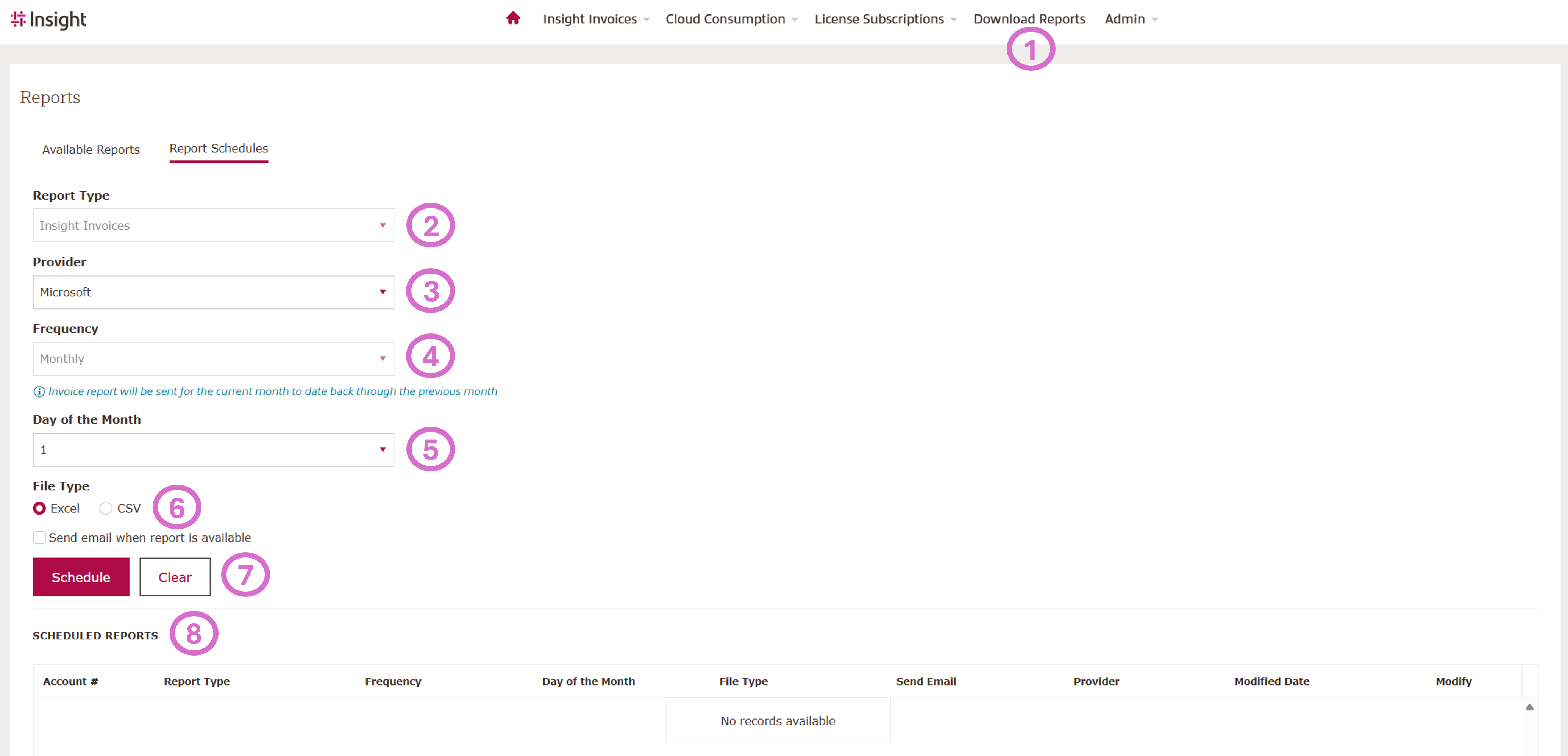
Clients can now schedule the Insight Invoice report by cloud provider to run automatically on a specific day of the month.
Each scheduled report includes invoice data from the previous month through the selected run date in the current month.
- Click On Download Reports
- Select the Type of Report
- Select your Cloud Provider
- Report Frequency (Monthly)
- Select the day of when your report should be created
- Selelct the File Type and request an email when the report is available
- Shedue the report
- Sheduled Reports
If you require support, please raise a support ticket here.
Your Insight Customer Success Manager is available to support you throughout the entire process.