Insight’s Reseller Admin Portal (RAP) – User Guide
16 – Microsoft Cancellations
How to process cancellations for Microsoft CSP products:
RAP is your platform to get the licenses you need. The following details provide instructions on how to cancel your Microsoft 365 (seat – based licenses), Software subscriptions and Perpetual Software purchases within CCx.
The Microsoft Cloud Care Reseller Agreement contains the terms & conditions accepted when purchasing Microsoft cloud products in CCx, including detailed information on renewal and cancellation.
When a new Microsoft 365 seat-based license subscription is purchased or renews, Microsoft allows the cancellation within 7 calendar days (168 hours) from the time of order or renewal only.
- Full credit will be applied for cancellation within 24 hours.
- Prorated refund for cancellation on days two through seven.
How to cancel Microsoft 365 seat-based subscriptions:
On the Subscription detail page, you will see a link on the left called Cancel.
Cancel allowed until Date & time stamp (UTC) are displayed, if the Cancel button is greyed out, the cancellation window has closed.
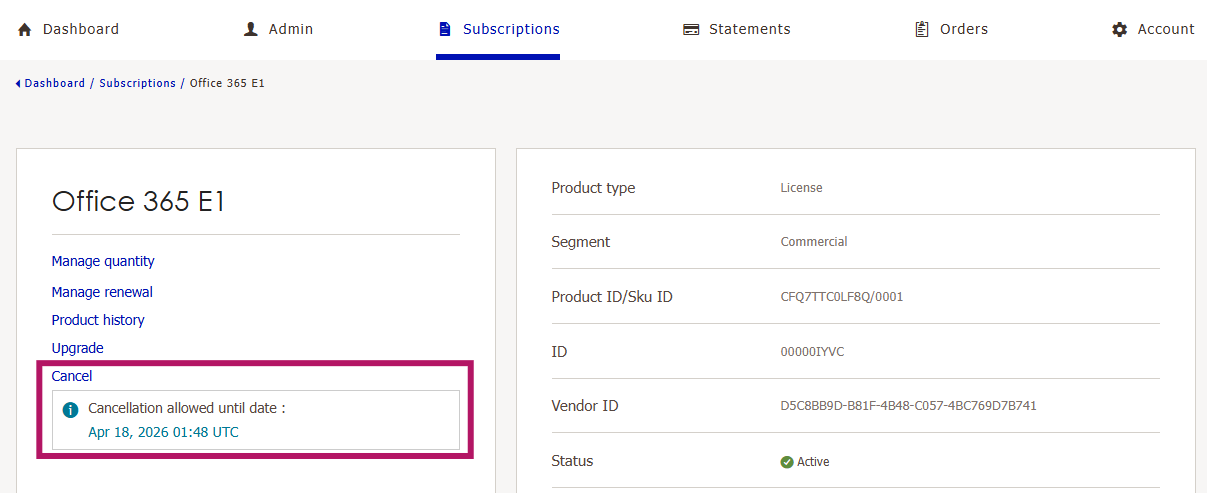
After Microsoft closes the 168-hour window, they will not allow cancellation or license count reduction until the end of the subscription term.
The window for license count modification and/or cancellation will open again at the next renewal.
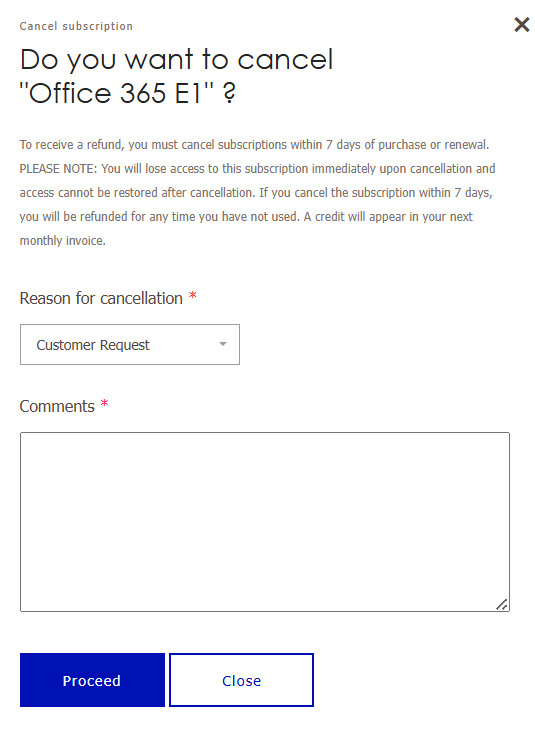
Click on Cancel to open the Cancel subscription window add the following information to proceed with the cancellation:
- Reason for cancellation
- Comments
How to cancel Software Subscriptions:
Software Subscriptions follow the same 7‑day (168‑hour) cancellation window and cancellation process as Microsoft 365 seat‑based subscriptions.
Please note the following important conditions:
- No refunds are available once Server Subscriptions have been provisioned and are in use, as outlined in the Microsoft Cloud Care Client Agreement.
- Cancellation requests must be submitted within the applicable 7‑day (168‑hour) window.
- Once provisioned and active, Software Subscriptions are non‑refundable, even if the cancellation window has not yet elapsed.
XXX - How to cancel Perpetual Software products:
Perpetual software products follow the same cancellation process described above. However, cancellations are only permitted within thirty (30) days of the order date.
- Partial cancellations are not permitted.
- A full refund may be issued for cancellations requested within thirty (30) days of purchase, subject to Microsoft’s program requirements and/or approval.
- Upon cancellation and refund, all associated license keys will be permanently deactivated.
After the 30‑day period has elapsed, perpetual software purchases are non‑cancelable and non‑refundable.