Insight's Cloud Care
Direct Client Invoice Guide
This invoice guide helps you understand the invoices you receive for your Cloud Care products.
Invoices for our Microsoft Cloud Care (CSP) products are typically issued at month-end.
These are separate from our Adobe VIP Marketplace invoices, which will be issued twice a month starting July 1, 2026.
Insight Cloud Care for Microsoft CSP products:
Our standard invoice preference for Microsoft CSP products creates a single invoice that includes CSP seat-based subscriptions, software subscriptions, perpetual software, and Azure services (including Azure Reservations, Azure savings plans, and Azure Marketplace).
You can also choose to split your invoices in the Microsoft invoice preference section on the CCx Account page by:
- Purchase order number: Each purchase order number generates a separate invoice. Subscriptions without a purchase order number are invoiced separately. You can update the purchase order number on the Subscription Detail page.
- Separate Azure and Microsoft 365 into two invoices: Two invoices will be generated: one for all Azure charges (consumption, Reservations, Marketplace, etc.) and one for all Microsoft 365 license subscriptions (including perpetual software and software subscriptions, etc.).
Note: If you are already using split invoicing by billing or shipping address, those separate invoices will remain in place in addition to the options above.
Any change made to invoice preferences after the 5th of the month may not take effect until the following billing cycle.
Insight Cloud Care for Adobe VIP Marketplace products:
Our standard invoice preference for Adobe VIP Marketplace products creates a single invoice for all Adobe products.
Automated invoices vs. manual invoices:
Automated invoices:
Automated invoices are issued directly from Insight’s Cloud Commerce Platform (CCx) for all subscriptions managed in CCx.
They are sent by email to your invoice contact.
A copy of your invoice can be downloaded from our Cloud Consumption Reporting tool (CCR). For more information on how to access invoices in CCR, and for detailed guidance on Cloud Consumption Reporting, please visit our CCR guide.
Automated invoices include the following information:
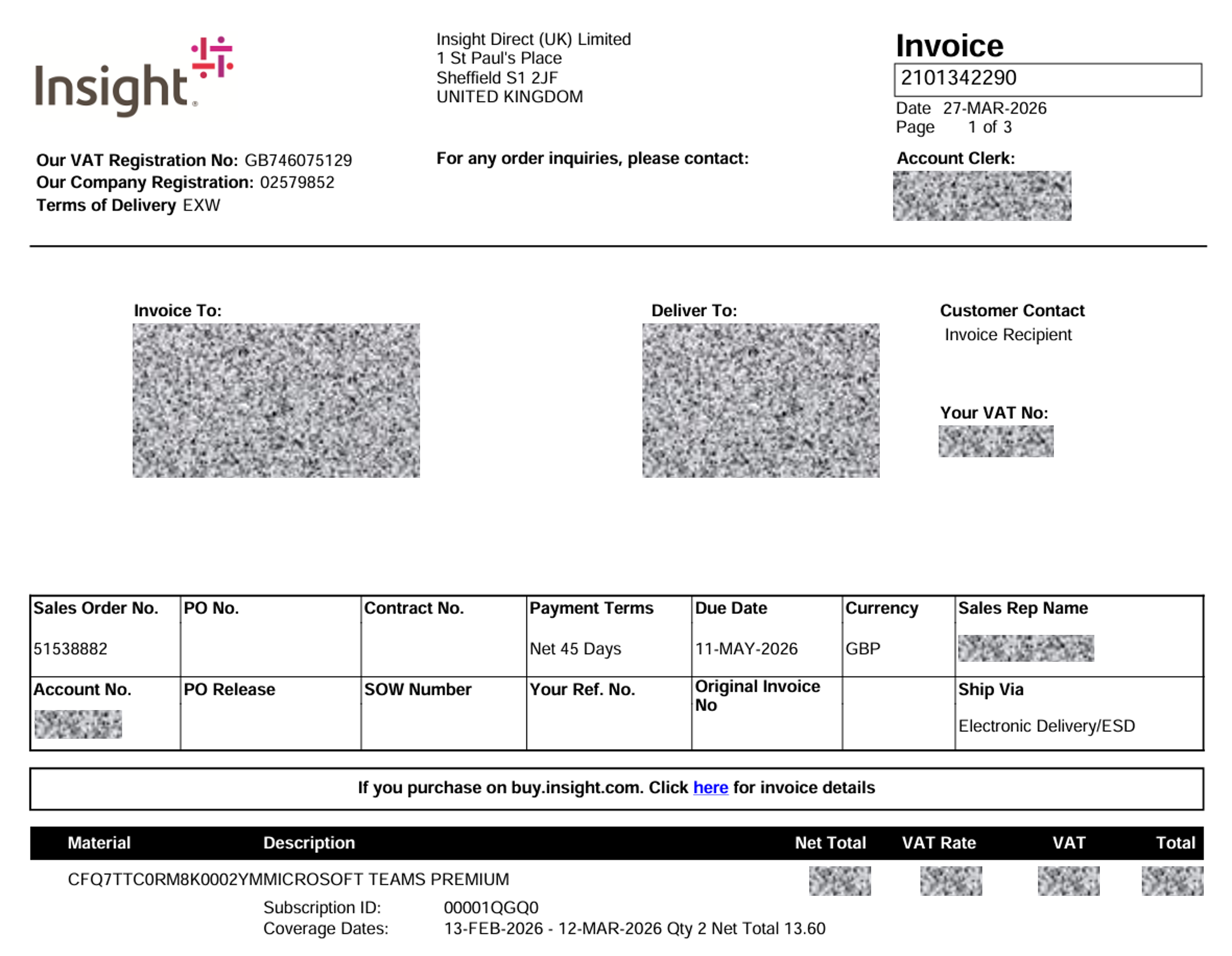
- Invoice number and Invoice issue date
- Invoice to and Delivery to address
- Customer Contact and Client’s VAT Number
- Sales Order Number
- Purchase order number: For the purchase order number to appear on the invoice, all subscriptions included on that invoice must have the same purchase order number. If different PO numbers are used per subscription, or if you require one invoice per PO number, please contact your Insight representative. If this is not specified, the “PO number” field will be blank or will display “NA”.
- Contract number (if applicable): The contract identifier associated with the purchase (if one applies). Otherwise this may show as “NA”.
- Payment Terms
- Invoice Due Date
- Currency
- Insight’s Sales Representative Name
- Account Number
- PO release (if applicable): A release number linked to the purchase order, if your procurement process uses PO releases. Otherwise this may show as “NA”.
- SOW number (if applicable): The statement of work reference number, if your agreement includes one. Otherwise this may show as “NA”.
- Your reference number (if applicable): An additional customer reference provided for your internal tracking (if supplied). Otherwise this may show as “NA”.
- Original invoice number (if applicable): The original invoice reference for credit notes or adjusted invoices. Otherwise this may show as “NA”.
- Ship via: This field is typically not applicable for subscription-based services and will usually display “NA”.
- Material ID: Vendor Product IDFilter by Service Name
- Description / Product Details: including the following information:
o Material Number / Cloud vendor product ID
o Description / Product Name
o Subscription ID (Insight specific Subscription ID)
o Coverage Dates / Usage Period
o Qty
Summary of charges (no mid-month quantity change):
VISIO PLAN 2 is purchased with monthly billing.
The billing start date is February 13, 2026, and the billing end date is March 12, 2026. The quantity is 28 licenses.

Summary of charges (mid-term quantity changes):
MICROSOFT 365 COPILOT is purchased with monthly billing.
The billing start date is February 13, 2026, and the billing end date is March 12, 2026. The quantity is 114 licenses.
On February 20, 2026, the customer purchased an additional 60 licenses, bringing the total to 174.
The invoice will include:
o an initial charge for 114 licenses for the full month;
o a credit for 114 licenses from February 20, 2026, to March 12, 2026; and
o an additional charge for 174 licenses from February 20, 2026, to March 12, 2026.

- NET Total
- VAT Rate
- VAT Amount
- Total
Manual invoices:
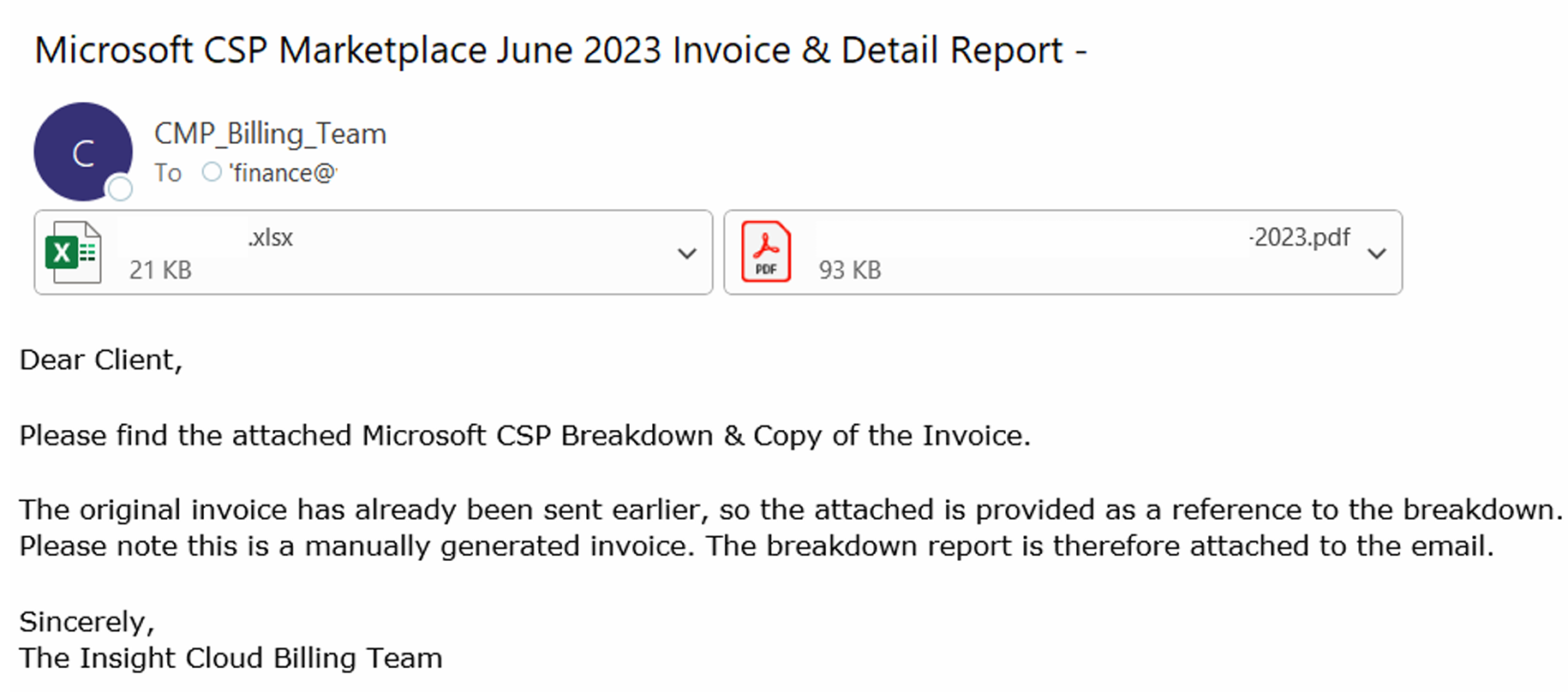
Manual invoices are sent by email in PDF format and are accompanied by an Excel file with a detailed consumption overview.
Manual invoices cover products purchased outside Insight’s Cloud Commerce Platform (CCx), such as Azure Marketplace, Azure Reserved Instances, Azure Savings Plans, and cloud subscriptions provisioned outside of CCx.
These invoices are sent from the following email address by month-end: cmp_billing_team@insight.com.
Please ensure we have the correct billing email address on file so invoices are sent to the right contact.
Below is an example of the email you will receive:
If you require support, please raise a support ticket here.
Your Insight Customer Success Manager is available to support you throughout the entire process.