Insight's Cloud Commerce Platform (CCx) User Guide
16-1 - Microsoft Co-Terminosity
How to use co-terminosity (end date allignment) for Microsoft CSP products:
CCx is your platform to get the licenses you need. The following details provide instructions on how to use NCE co-terminosity for your Microsoft 365-seat based purchases within CCx.
With the New Commerce Experience (NCE), Microsoft introduced a new CSP feature called co-terminosity. Co-terminosity is a feature that was not available in legacy CSP.
What is co-terminosity?
CSP subscriptions within NCE created on different dates have different end dates. Co-terminosity is the ability to align the end dates of seat-based subscriptions to make your license renewal easier.
How do I use co-terminosity within CCx?
You can align the end dates of your subscription(s) in two different ways in CCx:
- When purchasing a new seat-based subscription you will see a button option within your basket to Align end date with an existing NCE subscription already purchased within CCx, or with the end of the calendar month. (A detailed description on how to use this feature in cart, can be found in the How to purchase guide).
- When using the Manage Renewal functionality for your existing NCE subscription, you can choose to have a new end date alignment take effect at the next renewal of the subscription. (See more information in the Manage Renewal guide on how to use this feature for your existing subscriptions).
Are there any coterminosity alignment rules?
Yes. Co-terminosity can only be activated when a subscription is created or when it is renewed. Activating co-terminosity for an existing subscription mid-term (using the Manage Renewal functionality) does not change the end date of the existing term, rather it schedules the co-terminosity to be activated when the subscription next renews.
Microsoft allows a subscription to be made coterminous with an existing subscription according to the following table:
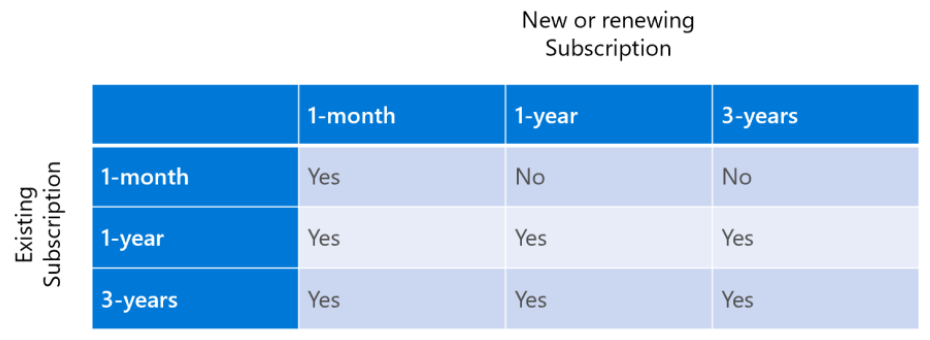
This means that a new or renewing 1- or 3-year subscription may not be made coterminous with a 1-month subscription.
Can I use co-terminosity at the time of an immediate (mid-term) upgrade?
No. When using the upgrade functionality to make an immediate (mid-term) change, Microsoft does not allow you to choose/change the end date. This end date attribute is fixed.
In NCE you can choose to upgrade into one of two types of “destination” subscriptions – a NEW subscription or an EXISTING subscription (if applicable).
Immediate (mid-term) upgrade into a NEW subscription: the end date of the new subscription for the more premium product is the SAME as the from subscription.
Example: Mid-term upgrade of O365 E3 licenses (with an end date of Aug 15, 2024) into a NEW subscription of M365 E3. The new subscription of the M365 E3 which is created will also have an end date of Aug 15, 2024 – keeping the term and end date the same for this mid-term change.
Immediate (mid-term) upgrade into an EXISTING subscription: the end date of the licenses upgraded into the existing subscription will take on the end date of that existing subscription.
Example: Mid-term upgrade of O365 E3 licenses (with an end date of Aug 15, 2024) into an EXISTING subscription of M365 E3 (with an end date of Nov 1, 2024). The end date of the O365 E3 licenses that are upgraded into the M365 E3 subscription will become Nov 1, 2024 - taking on the same end date of the licenses in that existing subscription container.
Can I use co-terminosity at the time of an upgrade at renewal?
Yes. One of the options you can choose in the Manage Renewal functionality is to upgrade to a new product at renewal. You can choose to upgrade AND choose a new end date alignment, and both actions will take effect at the next renewal of your subscription.
Example: You have an O365 E3 subscription (with an end date of June 1, 2024). You want to upgrade that subscription – at the time of renewal, June 1, 2024 - to M365 E3 and align the end date to your M365 E5 subscription (which has an end date of March 1, 2025).
Using the Manage Renewal functionality you can scheduled BOTH of these changes to take effect on the next renewal. On June 2, 2024, the subscription of O365 E3 would be upgraded into a *NEW subscription of M365 E3 with a NEW end date of March 1, 2025.
Please note: Microsoft does not currently allow for an upgrade into an existing subscription at the time of renewal. This type of change cannot be scheduled and must be done through an immediate (mid-term) upgrade.
Can I use co-terminosity for my Software Subscriptions puchases?
No. Currently Microsoft only allows activation of co-terminosity (aligning end dates) of Microsoft 365-seat based subscriptions.
How am I billed when I use co-terminosity to align the end dates of my new or renewing subscriptions?
In the first bill after the Align end date co-terminosity feature is activated – either at time of purchase or at time of renewal - Microsoft will prorate the billing to charge the number of days from existing day-of-the-month to new chosen co-term day-of-the-month PLUS monthly cycle Charge (as expected). Then moving forward, if no changes are made, you will be charged for the monthly cycle Charge each month until the end of the term.
Is it possible to use co-terminosity for new subscriptions with my CSP legacy seat-based licenses or with licenses not in CCx?
No, you cannot, and this is a Microsoft restriction.
If you have subscriptions in both legacy CSP and NCE, it is only the NCE subscriptions that may be made coterminous with each other – and only if those NCE subscriptions are also purchased from Insight within CCx.
If you have purchased licenses through Web Direct or an Enterprise Agreement, a NCE subscription may not be made co-terminous with these licenses.